Product design case study
Making sustainability reporting more accessible to SMEs.
A digital sustainability platform concept designed to help small and medium-sized businesses organise sustainability information, navigate reporting and access expert support.
Client
greenimpact.io
Role
Visual & UX Designer
Scope
Product discovery, UX flows, visual identity and UI design
Status
Closed beta · Not publicly launched
01 — The opportunity
From a sustainability community to a digital product.
Green Impact began as an initiative to promote and monetise a community of SMEs committed to accelerating the green transition.
Interviews with potential users revealed a broader opportunity: businesses needed more accessible ways to navigate sustainability reporting, organise information and find appropriate support.
The concept evolved into a digital toolkit combining reporting tools, a central workspace, expert guidance and visibility for sustainable businesses.
- Starting pointA community of green SMEs
- What interviews showedReporting, information and support were hard to navigate
- DirectionA sustainability toolkit
02 — The problem
Sustainability shouldn't require a dedicated team.
SMEs often manage sustainability responsibilities alongside everyday business operations. Without dedicated expertise, understanding reporting expectations, collecting information and knowing where to get help can be challenging — whether or not a business falls under specific legal requirements such as the CSRD.
Three challenges informed the design direction.
-
Complexity
Sustainability reporting can be difficult to navigate without specialist knowledge.
Design responseGuided onboarding and accessible reporting tools.
-
Scattered information
Sustainability data and supporting documents may be spread across teams and systems.
Design responseA central workspace for sustainability information and files.
-
Limited access to expertise
Businesses may need guidance beyond what a self-service tool can provide.
Design responseA Help Center and a route to specialist consulting.
03 — The approach
Understand the problem before designing the solution.
I used the Double Diamond framework to structure the work, moving from exploring user needs to defining the opportunity, developing the experience and delivering the interface concept.
Discover
Explore user needs through interviews with potential end users, market analysis and competitive research.
Define
Clarify the target audience, core challenges, product direction and key user journeys.
Develop
Translate the product direction into user flows, wireframes and interface concepts.
Deliver
Develop the visual identity, interface design, iconography and reusable components.
04 — The design goals
One toolkit. Three core user needs.
-
Make it easier to get started
Guide users through registration and tool activation, making the first steps more approachable.
-
Bring information together
Create a central place to access sustainability data, files and relevant tools.
-
Make support accessible
Combine self-service guidance with a path to specialist expertise.
The wider product concept also included Green Profiles, helping businesses communicate their sustainability initiatives and connect with the wider green community.
05 — The solution
Five flows. One connected sustainability toolkit.
The platform concept brings together five key experiences designed to help SMEs get started, manage sustainability information, find support and communicate their sustainability efforts. These are the designed flows from the closed beta.

01
Easy registration
A straightforward registration journey designed to help users get started with the platform.

02
Tools activation
A guided flow for activating the tools users need, helping them move from registration towards using the platform.

03
Help Center
A self-service support experience designed to help users find guidance and navigate the platform when they need assistance.
04 · The central workspace
Data Overview & Files
A central workspace designed to make sustainability information and supporting files easier to access and manage.


05 · Complementary
Green Profiles
A way for businesses to communicate their sustainability identity and initiatives, supporting visibility and potential connections within the wider green business community.
Together, the five flows connect initial setup, tool access, ongoing support, information management and business visibility.
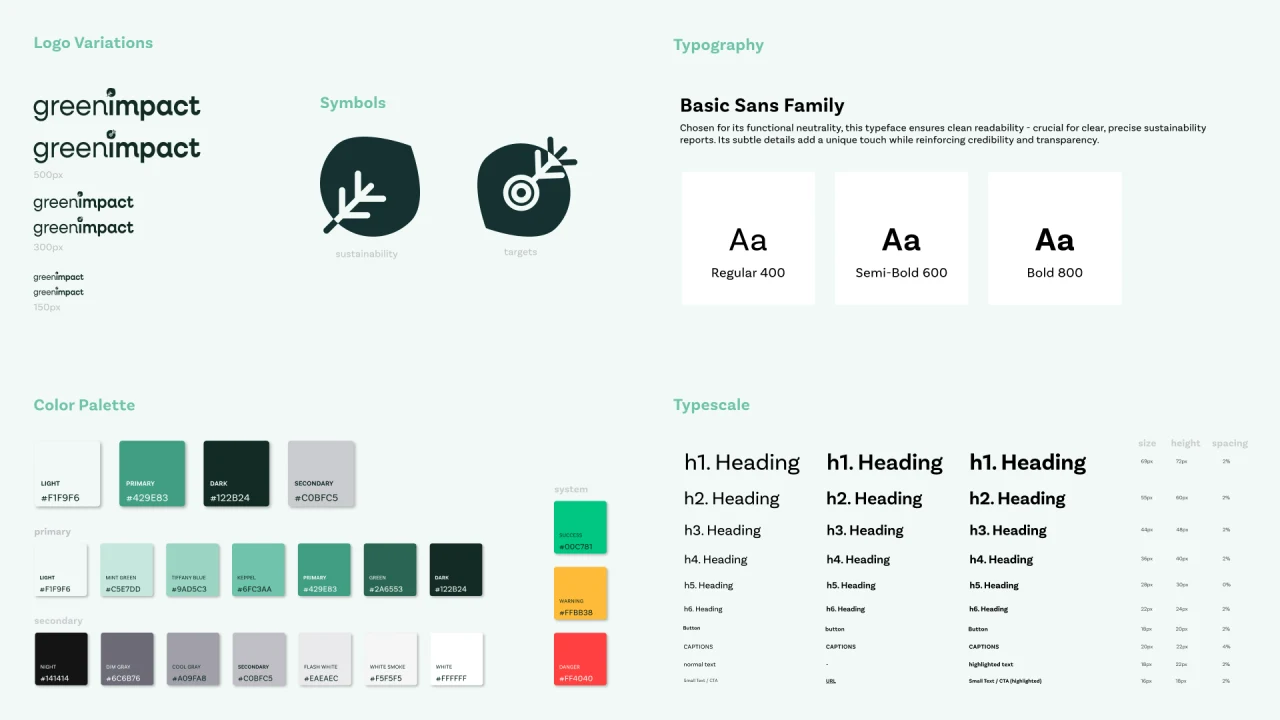
06 — Design system
A consistent foundation for the experience.
The visual identity, iconography and reusable UI components established a consistent design language across the platform's different areas.
07 — Key design decisions
Designed around clarity and accessibility.
-
Break down complexity
Organise the experience around distinct user tasks rather than presenting sustainability reporting as one overwhelming process.
-
Centralise information
Bring sustainability data and files into a shared workspace to make information easier to find and manage.
-
Combine self-service with expert support
Offer accessible guidance while providing a route to specialist help when needed.
-
Connect reporting with visibility
Include Green Profiles as a complementary benefit, extending the platform beyond reporting into communication and community.
08 — Outcomes
Early interest in the concept.
- 120
- Pre-registrations Users pre-registered in connection with the concept presentation at the SDG Tech Awards 2024, according to the project records.
- 5
- Core user flows Easy registration, Tools activation, Help Center, Data Overview & Files, and Green Profiles.
- Closed beta
- Product status The product was not publicly launched, so post-launch adoption and retention metrics were unavailable.
Pre-registrations signal early interest in the concept — not usability, sustained adoption or product-market fit.
09 — Reflection
Turning complexity into a clearer experience.
This project reinforced the importance of understanding user needs before defining a product solution. It also highlighted the challenge of making a complex domain feel approachable through clear user flows, accessible support and a consistent interface.
With more time, I would validate the core journeys through usability testing and use observed user behaviour to prioritise further improvements.